NativeLenSA CISD w/1st 5m FVG5m CISD + FVG Indicator which works best on 5m TimeFrame, with the concept of 5m Liquidity sweeps of the previous highs/lows and the next candle closing below/above the opening price of candle that swept the highs/lows.
A line marking +CISD or -CISD will show as soon as the CISD is created, and a first 5m Fair Value Gap will also be displayed. This is advantageous for an extra confluence and re-entry.
The indicator also provides the trader with:
i. The flexibility of allowing to only show Bearish, Bullish or both Bearish and Bullish CISD + FVG,
ii. Showing only London Session, New York Session, or both London and New York Sessions' CISD & FVG,
iii. Option of hiding/showing 5m CISD+FVG on time frames greater than 5m,
iv. Adjustable:
(a) Look back bars (max=300),
(b) CISD line length,
(c) FVG line length,
v. Customizable Bearish and Bullish CISD line colors.
I hope you find value in this indicator, and convenient for time when trading, no CISD markups needed
"fair value gap"に関するスクリプトを検索

🟡🔵🟢🔴Beginner's Assistant by carljchapman🟡🔵🟢🔴
Overview
This indicator dynamically marks highs and lows of the premarket (4:00am-9:30amEST) and opening range. It displays Fair Value Gaps, 9 and 21 period Exponential Moving Averages (EMA) and the Volume Weighted Average Price (VWAP). To really help beginners, it marks suggested entry points on the chart with green or red triangles, when a reasonable trend appears.
Features
Automatically draws blue lines for Premarket High and Low values
Dynamically marks the opening Range region
Visual entry signals for long and short opportunities
Primarily used for stocks/funds , but works with forex and crypto
Quick configuration settings to tailor details for your experience level
Mobile friendly mode
Supports alerts
How To Use
Open your chart, and select a 1 or 2 minute timeframe.
Watch for green triangles and red triangles, hinting at entries for long or short positions. Pay particular attention to the price action as it approaches the bounds of the opening range and the premarket levels. I suggest also using a MACD indicator for confirmation of the trend.
For scalping 0dte Options, switch frequently between the 1 ,2 and 5 minute or higher timeframes. Do this so you will not miss an entry opportunity or be unaware of the overall trend.
As a beginner, until you have refined your strategy and develop risk management, take profits as low as 10%. A small profit can quickly become a much larger loss. With 0dte options, time will devour your profits even when the price doesn’t budge.
What makes this indicator so beginner friendly?
Charts with too many lines and colors are are a nightmare for beginners! And empty charts do not tell the whole story. Simple checkboxes in the configuration settings let you turn on and off features to match your comfort level. As you become more familiar you might try turning off the suggested entries to see if you would have selected the same or better ones yourself. Just one example of how you will learn and verify your knowledge. You will quickly spot Opening Range Breakouts and more.
Why are the triangle pointers not simply above or below the bars?
As a beginner, I like to review charts to see how much the price changed, then estimate how much a contract would move based on its delta. A mouthful, I know. But what price does an arrow pointing up below a bar reflect? Would I have entered at the open or close, low or high? This indicator helps by putting the marker close to the price when indicated. It can even display the actual price on the bar. This is helpful for you to make fast calculations without a measuring tool.
I am an experienced trader. Can this help me make winning trades?
Sure. It can also help you make losing ones! Profit is not guaranteed with any indicator or strategy. This indicator is designed to assist you as you learn and while you trade. You won't see the words BUY or SELL. This is not a signal bot! It is merely a tool to assist you. You can learn a lot by spending time observing price movement using this indicator without ever making a single trade.
🟡🔵🟢🔴

Midnight 30min High/LowMidnight 30min High/Low — Overnight Liquidity Range Tracker
Capture the Overnight Session: A Strategic Level Identification Tool from Professional Trading Methodology
This indicator captures the high and low prices during the critical 30-minute midnight session (12:00-12:30 AM EST) and projects these levels forward as key support and resistance zones. These overnight ranges often contain significant liquidity and serve as crucial reference points for intraday price action, representing areas where institutional activity may have established important levels.
🔍 What This Script Does:
Identifies Critical Overnight Session Levels
- Automatically detects the 12:00-12:30 AM EST session window
- Captures the highest and lowest prices during this 30-minute period
- Projects these levels forward for multiple trading days
Creates Dynamic Support/Resistance Zones
- Extends midnight high/low levels as horizontal lines with customizable projection periods
- Fills the area between high and low to create a visual trading range
- Updates automatically each trading day with new overnight levels
Provides Clear Visual Reference Points
- Optional session start markers (●) highlight when the midnight session begins
- Color-coded lines distinguish between high and low levels
- Transparent fill area creates an easy-to-identify trading zone
Real-Time Level Tracking
- Updates levels in real-time during the active midnight session
- Maintains historical levels for reference and backtesting
- Compatible with data window for precise level values
⚙️ Customization Options:
Extend Days (1-30):** Control how many days forward the levels are projected (default: 5 days)
High Line Color:** Customize the midnight high line color (default: blue)
Low Line Color:** Customize the midnight low line color (default: orange)
Fill Color:** Adjust the transparency and color of the range area (default: light aqua, 80% transparency)
Show Session Markers:** Toggle yellow session start indicators on/off (default: enabled)
💡 How to Use:
Deploy on lower timeframes (1m-15m) for precise level identification and reaction monitoring**
Watch for key price interactions:
- Rejection at midnight high levels (potential resistance)
- Bounce from midnight low levels (potential support)
- Range-bound trading between the high and low levels
Combine with liquidity concepts:
- Monitor for stop hunts above/below these levels
- Look for false breakouts that snap back into the range
- Use as confluence with other ICT concepts like FVGs and Order Blocks
Strategic Applications:
- Range trading between midnight levels
- Breakout confirmation when price closes decisively outside the range
- Support/resistance validation for entry and exit planning
🔗 Combine With These Tools for Complete Market Structure Analysis:
✅ First FVG — Opening Range Fair Value Gap Detector.
✅ ICT Turtle Soup (Liquidity Reversal)— Spot stop hunts and false breakout scenarios
✅ ICT Macro Zones (Grey Box Version)- It tracks real-time highs and lows for each Silver Bullet session
✅ ICT SMC Liquidity Grabs and OBs- Liquidity Grabs, Order Block Zones, and Fibonacci OTE Levels, allowing traders to identify institutional entry models with clean, rule-based visual signals.
Together, these tools create a comprehensive Smart Money Concepts (SMC) framework — helping traders identify, anticipate, and capitalize on institutional-level price movements with precision and confidence during critical overnight sessions.

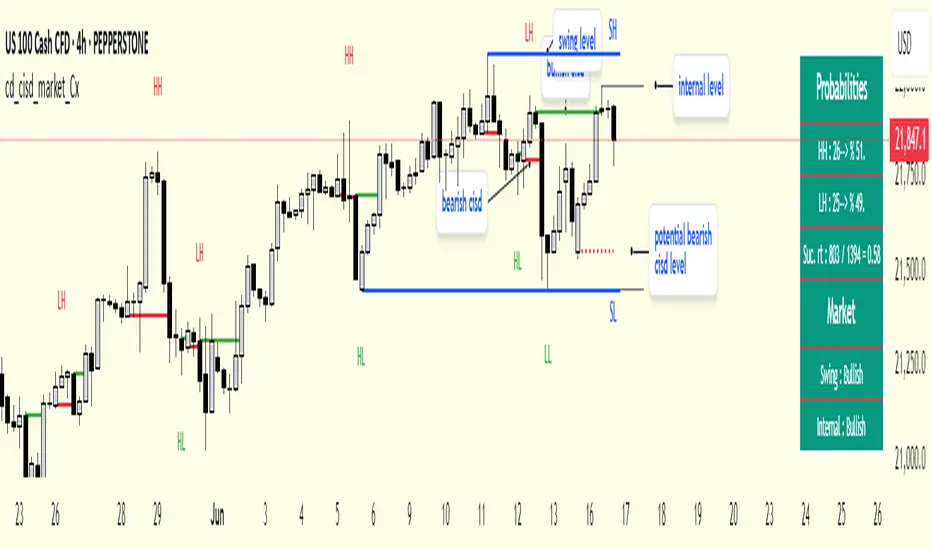
cd_cisd_market_CxHi Traders,
Overview:
Many traders follow market structure to identify the market direction and seek trade opportunities in line with the trend.
However, markings derived from user-defined inputs can create different structures, depending on personal choices. For instance, choosing a pivot distance of 3 instead of 2 alters the structure, even though the chart remains the same. Ideally, the structure should remain consistent.
"Change in State Delivery" ( CISD ) is a widely accepted concept among traders and is considered a significant indicator of market direction based on the gain/loss of CISD levels.
In this indicator, CISD is selected as the primary criterion for marking market structure, eliminating the influence of user-dependent variations.
Here is a summary of the key logic and rules applied:
• When the price forms a new high/low, that level is only considered a pivot if a CISD has occurred.
• A bullish CISD is always followed by a bearish CISD, and vice versa.
• Pivot points form the internal structure.
• The internal structure is used to interpret the swing structure.
• Probabilities are derived from internal structure patterns.
________________________________________
Details:
How is CISD determined?
As is commonly known:
• When price makes a new high, the opening level of the first candle in the consecutive bullish candle sequence is marked.
• When price makes a new low, the opening of the first candle in the consecutive bearish sequence is marked.
• If there’s only one candle in the sequence, its opening level is used.
In a bullish market, losing a bearish CISD level (i.e., a close below it) or in a bearish market, gaining a bullish CISD level (i.e., a close above it) is interpreted as a potential shift in buyer-seller dominance and a possible market reversal.
________________________________________
How are internal (pivot) levels determined?
• When price closes below a bearish CISD level, the highest candle's high becomes a pivot high (PH).
• When price closes above a bullish CISD level, the lowest candle's low becomes a pivot low (PL).
• If the new PH is above the previous PH, it’s labeled as HH (Higher High); otherwise, LH (Lower High).
• If the new PL is below the previous PL, it’s labeled as LL (Lower Low); otherwise, HL (Higher Low).
________________________________________
Internal Market Structure:
• A series of HHs indicates a bullish internal structure.
• A series of LLs indicates a bearish internal structure.
________________________________________
Swing (Main) Market Structure:
Using internal pivots and previous swing levels, the main market structure is derived.
• A new swing high (SH) requires the price to move above the previous SH.
• A new swing low (SL) requires the price to move below the previous SL.
________________________________________
Probability Calculation:
Pivot levels forming the internal structure are coded as five-element sequences.
There are 64 possible combinations of such sequences made from consecutive PH and PL values.
Each pattern’s frequency from its starting candle is tracked.
To make it more understandable:
For example, after the four-sequence “HH, LL, LH,HL”, either HH or LH might follow.
The table shows the statistical likelihood of both possible outcomes for the most recent four-element sequence on the chart.
________________________________________
How reliable is it?
To assess reliability, results are calculated from the beginning using:
Success Rate (Suc. Rt) = Number of Correct Predictions / Total Predictions
This value is added to the table for reference.
It’s important to note that no statistical outcome guarantees certainty—every result offers a different interpretation. What truly matters is to avoid getting stopped out 😊.
________________________________________
Menu Options:
Show/hide preferences and color selections can be customized via the indicator menu.
________________________________________
What’s Coming in Future Versions?
Features such as FVG (Fair Value Gaps) between swing levels, volume imbalances, order blocks / mitigation blocks, Fibonacci levels, and relevant trade suggestions will be added.
________________________________________
This is a BETA version that I believe will help simplify your market reading. I’d be happy to hear your feedback and suggestions.
Cheerful Trading!
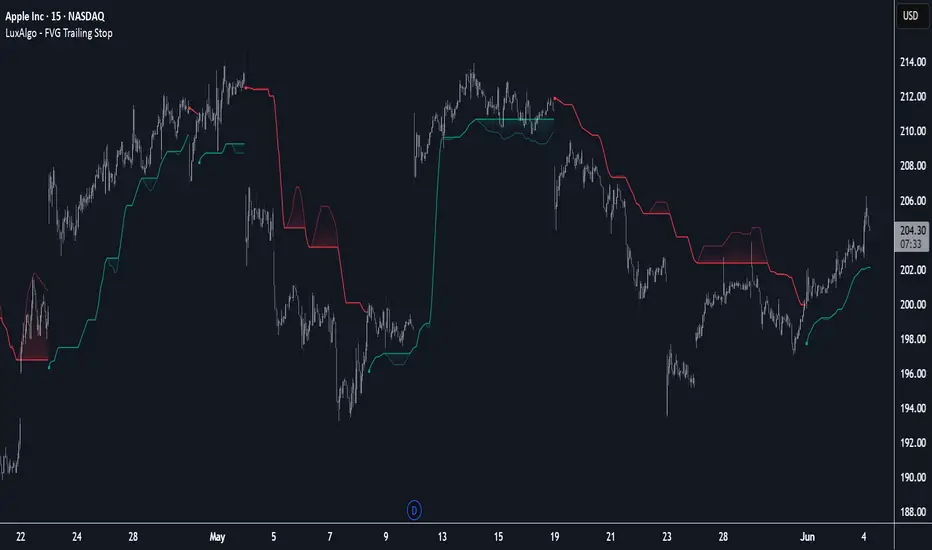
FVG Trailing Stop [LuxAlgo]The FVG Trailing Stop indicator tracks unmitigated Fair Value Gaps (FVG) data to produce a Trailing Stop indicator able to determine if the market is uptrending or downtrending easily.
🔶 USAGE
The FVG Trailing Stop is intended to identify trend directions through its position relative to the closing price:
Bullish: Price is located above the Trailing Stop, indicating that all Bearish FVGs have been mitigated and the trend is anticipated to continue upwards.
Bearish State: Price is located below the Trailing Stop, indicating that all Bullish FVGs have been mitigated and the trend is anticipated to continue downwards.
The Trailing Stop originates from two extremities obtained from the average of respective unmitigated FVGs. The specific directional average is also displayed as a more transparent secondary line, however, the trailing stop is derived from this value and a new trend will not be detected until the opposite directional average is crossed.
Price reaching the Trailing Stop is caused by retracements and can lead to the following scenarios:
Outcome 1: The directional average is crossed next, indicating a new trend direction.
Outcome 2: The directional average is held as support or resistance, leading to a new impulse and a continuation of the trend.
🔹 Reset on Cross
While price crossing the Trailing Stop should be considered as a sign of an upcoming trend change; it is possible for the price to still evolve outside it.
As a solution, we have included the "Reset on Cross" feature, which (as the name suggests) hides and resets the Trailing Stop each time it is crossed, leading to a "Neutral" state.
This opens the opportunity for the Trailing Stop to be displayed again once the price moves again in the direction of the pre-established trend. A trader might use this to accumulate positions within a specific trend.
🔶 DETAILS
The script uses a typical identification method for FVGs. Once identified, the script collects the point of the FVG farthest from the current price when formed.
For Upwards FVGs this is the bottom of the FVG.
For Downwards FVGs this is the top of the FVG.
The data is managed only to use the last input lookback of FVGs. If an FVG is mitigated, it frees up a spot in the memory for a new FVG, however, if the lookback is full, the oldest will be deleted.
From there, it uses a "trailing" logic only to move the Trailing Stop in one direction until the trailing stop resets or the direction flips.
The extremities used to calculate the Trailing Stop are created from 2 calculation steps, the first step involves taking the raw average of the FVG mitigation levels, and the second step applies a simple moving average (SMA) smoothing of the precedent-obtained averages.
🔶 SETTINGS
Unmitigated FVG Lookback: Sets the maximum number of Unmitigated FVGs that the script will use.
Smoothing Length: Sets the smoothing length for the Trailing Stop to reduce erratic results.
Reset on Cross: When enabled, hide and reset the Trailing Stop until the price starts moving in the pre-established trend direction again.
UT Bot + Cooldown + Visual FVGSynopsis – UT Bot + Cooldown + Visual FVG
This TradingView script combines:
✅ UT Bot Reversal Signals
Based on ATR and volatility logic
BUY when trend flips from bearish to bullish
SELL when trend flips from bullish to bearish
✅ Cooldown Filter
Limits signals to 1 per X bars (default 30)
Prevents overtrading during choppy price action
✅ Optional FVG Markers (Fair Value Gaps)
Visually shows bullish or bearish imbalances (3-bar gaps)
Does not affect signal generation — only for confluence
🔍 Ideal for traders who want clean, time-filtered signals with visual price-action context. Suitable for futures, crypto, or forex on intraday charts.

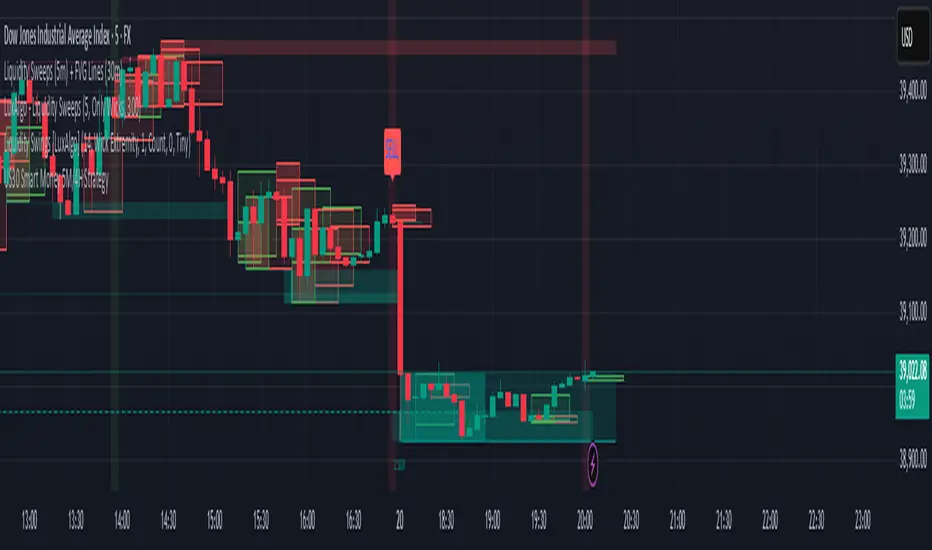
US30 Smart Money 5M/4H Strategy🧠 How It Works
✅ 1. 4H Trend Bias Detection
Uses the 4-hour chart (internally) to determine if the market is in an uptrend or downtrend.
Background turns green for bullish trend, red for bearish trend.
This helps filter trades — only take longs during uptrend, shorts during downtrend.
✅ 2. Liquidity Sweeps (Stop Hunts) on 5M
Highlights candles that break previous highs/lows and then reverse (typical of institutional stop raids).
Draws a shaded red box above sweep-high candles and green box under sweep-lows.
These indicate key reversal zones.
✅ 3. Order Block Zones
Detects bullish/bearish engulfing patterns after liquidity sweeps.
Draws a supply or demand zone box extending forward.
These zones show where institutions likely placed large orders.
✅ 4. FVG Midpoint from 30-Min Chart
Detects Fair Value Gaps (imbalances) on the 30-minute chart.
Plots a line at the midpoint of the gap (EQ level), which is often revisited for entries or rejections.
✅ 5. Buy/Sell Signals (Non-Repainting)
Buy = 4H uptrend + 5M liquidity sweep low + bullish engulfing candle.
Sell = 4H downtrend + 5M liquidity sweep high + bearish engulfing.
Prints green “BUY” or red “SELL” label on the chart — these do not repaint.
📈 How to Use It
Wait for trend bias — only take trades in the direction of the 4H trend.
Watch for liquidity sweep boxes — these hint a stop hunt just occurred.
Look for a signal label (BUY/SELL) — confirms entry criteria.
Use FVG EQ lines & Order Block zones as confluence or targets.
Take trades after NY open (9:30 AM EST) for best momentum.
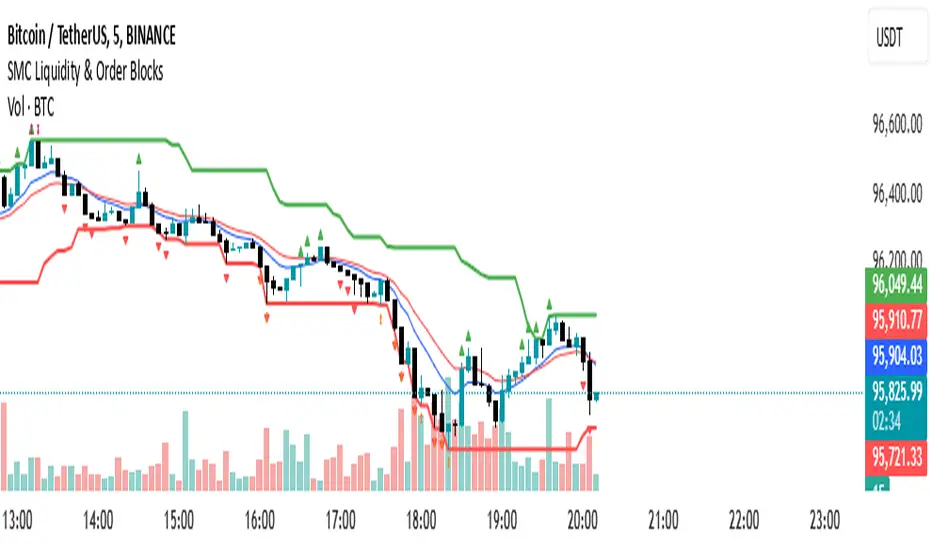
SMC Liquidity & Order Blocks🔹 1. Moving Averages for Trend Confirmation
Uses Exponential Moving Averages (EMA) to determine trend direction.
9-period EMA (blue) and 15-period EMA (red) are plotted.
🔹 2. Liquidity Zones (Swing Highs & Lows)
Identifies liquidity zones where price is likely to react.
Buy-Side Liquidity: Highest high over 20 periods (Green line).
Sell-Side Liquidity: Lowest low over 20 periods (Red line).
🔹 3. Order Block Detection
Detects bullish and bearish order blocks (key price zones of institutional activity).
Bullish Order Block (OB): Formed when the highest close over 5 bars exceeds the highest high.
Bearish Order Block (OB): Formed when the lowest close over 5 bars is lower than the lowest low.
Plotted using green (up-triangle) for bullish OB and red (down-triangle) for bearish OB.
🔹 4. Fair Value Gaps (FVG)
Detects price inefficiencies (gaps between candles).
FVG Up: When a candle's high is lower than a candle two bars ahead.
FVG Down: When a candle's low is higher than a candle two bars ahead.
Plotted using blue circles (FVG Up) and orange circles (FVG Down).
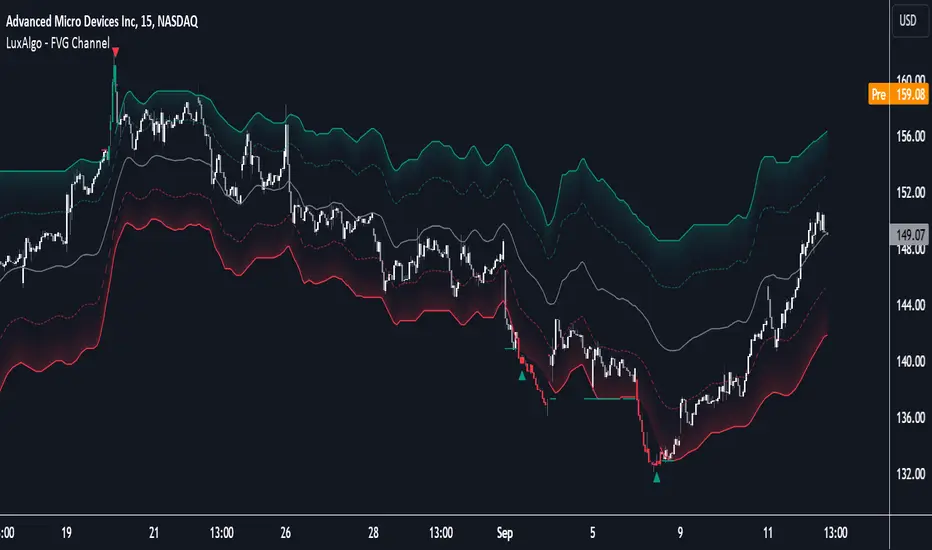
FVG Channel [LuxAlgo]The FVG Channel indicator displays a channel constructed from the averages of unmitigated historical fair value gaps (FVG), allowing to identify trends and potential reversals in the market.
Users can control the amount of FVGs to consider for the calculation of the channels, as well as their degree of smoothness through user settings.
🔶 USAGE
The FVG Channel is constructed by averaging together recent unmitigated Bullish FVGs (contributing to the creation of the upper bands), and Bearish unmitigated FVGs (contributing to the creation of the lower bands) within a lookback determined by the user. A higher lookback will return longer-term indications from the indicator.
The channel includes 5 bands, with one upper and one lower outer extremities, as well as an inner series of values determined using the Fibonacci ratios (respectively 0.786, 0.5, 0.236) from the channel's outer extremities.
An uptrend can be identified by price holding above the inner upper band (obtained from the 0.786 ratio), this band can also provide occasional support when the price retraces to it while in an uptrend.
Breaking below the inner upper band with an unwillingness to reach above again is a clear sign of hesitation in the market and can be indicative of an upcoming consolidation or reversal.
This can directly be applied to downtrends as well, below are examples displaying both scenarios.
Uptrend Example:
Downtrend Example:
🔹 Breakout Levels
When the price mitigates all FVGs in a single direction except for 1, the indicator will display a "Breakout Level". This is the level that price will need to cross in order for all FVGs in that direction to be mitigated, because of this they can also be aptly called "Last Stand Levels".
These levels can be considered as potential support and resistance levels, however, should always be monitored for breakouts since a substantial push above or below these points would indicate strong momentum.
🔹 Signals
The indicator includes Bullish and Bearish Signals, these signals fire when all FVGs for a single direction have been mitigated and an engulfing candle occurs in the opposite direction. These are reversal signals and should be used alongside other indicators to appropriately manage risk.
Note: When all FVGs in a single direction have been mitigated, the candles will change colors accordingly.
🔶 DETAILS
The script uses a typical identification method for FVGs. Once identified, the script collects and stores the mitigation levels of the respective bullish and bearish FVGs:
For Bullish FVGs this is the bottom of the FVG.
For Bearish FVGs this is the top of the FVG.
The data is managed to only consider a specific amount of FVG mitigation levels, determined by the set "Unmitigated FVG Lookback". If an FVG is mitigated, it frees up a spot in the memory for a new FVG, however, if the memory is full, the oldest will be deleted.
The averages displayed (Channel Upper and Lower) are created from 2 calculation steps, the first step involves taking the raw average of the FVG mitigation levels, and the second step applies a simple moving average (SMA) smoothing of the precedent obtained averages.
Note: To view the mitigation levels average obtained in the first step, the "Smoothing Length" can be set to 1.
🔶 SETTINGS
Unmitigated FVG Lookback: Sets the maximum number of Unmitigated FVG mitigation levels that the script will use to calculate the channel.
Smoothing Length: Sets the smoothing length for the channel to reduce noise from the raw data.
Mark FVGsMark FVGs is marking FVG (stands for Fair Value Gap, other name is Imbalance or IMB) on your chart so that you can instantly detect them
It supports:
- marking bullish and bearish partly filled or unfilled FVGs of the current timeframe
- marking bullish and bearish already filled FVGs of the current timeframe
- marking bullish and bearish FVGs of the any 4 timeframes on your current timeframe
technically it re-builds them on the last bar or as soon as new realtime bar is updated. it looks with 1k bars back to find the nearest specific number of FGVs
Adjustments:
- changing the maximum number of FVGs to display.
- changing the color of FVG area
- displaying already filled FVG of the current time frame
- changing the mode of displaying area it can either extended or fixed width
- displaying labels of other time frame FVGs

MTF fair value gap v2 thigh gaps yumwell load in 2 FVG indicators one for current chart then one for MTF of interest.
Higher timeframe FVGs are more important and can be used for bias or even targets for internal liquidity.
big thanks @shanxia for basically re-doing the FVGs into arrays hehehe..
Can now delete mitigated or change mitigated color..
I dont know who uses extensions but if you want to suffer in your private time then go ahead...
pre sure this is the sexiest FVG indicator validate me in the description pls
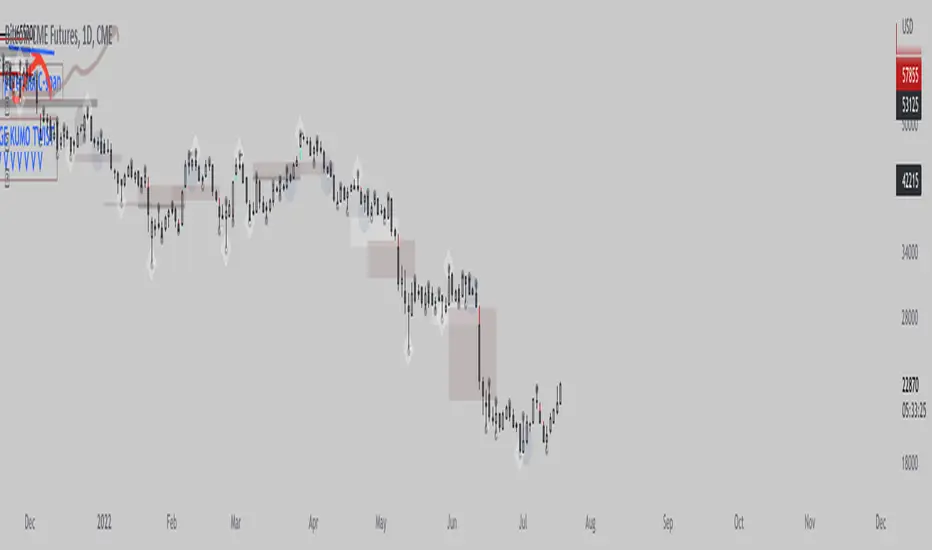
All in One Trend Indicator by Nicks**Multi-Factor Confluence Suite (7-in-1 Overlay)**
### **Description:**
**Overview**
This script is a comprehensive workspace optimizer designed to combine 7 essential trading tools into a single, efficient overlay. By merging trend analysis, market structure, liquidity zones, and momentum signals, this tool allows traders to bypass the standard indicator limit and view high-probability confluence setups without a cluttered chart.
**Key Features & Functionality**
* **Trend Filtering (Hull Suite):**
* A lag-reduced moving average system that visualizes the macro trend.
* Includes candle coloring options to easily identify trend alignment.
* **Market Structure (SMC):**
* Automatically maps Break of Structure (BOS) and Change of Character (CHoCH).
* Identifies Order Blocks and Fair Value Gaps (FVG) for potential entry/exit zones.
* **Liquidity Analysis:**
* **Swings:** Highlights key swing highs and lows where stop losses typically reside.
* **Grabs:** Specifically detects "stop hunts" where price wicks liquidity before reversing (Bubbles visualization).
* **Momentum Signals (UT Bot & MACD):**
* **UT Bot:** Provides high-sensitivity Buy/Sell labels based on ATR trailing stops.
* **MACD Overlay:** Plots signal crossovers directly on the price chart (arrows) to identify momentum shifts without occupying a separate oscillator pane.
* **Session Timing:**
* Visualizes major trading sessions (NY, London, Tokyo, Sydney) with an optional dashboard table.
**How to Use**
This suite is designed for "Confluence Trading."
1. **Identify Trend:** Use the Hull Suite color to determine the directional bias.
2. **Find Structure:** Wait for price to react at an SMC Order Block or Liquidity Zone.
3. **Confirm Entry:** Look for a UT Bot label or MACD Arrow in the direction of the trend.
**Settings**
Each module is separated by headers in the settings menu. You can toggle specific indicators on/off to suit your trading style and keep the chart clean.
**Credits & Attribution**
This script is a compilation of open-source logic from the TradingView community, adapted and updated to Pine Script v5/v6 for compatibility. Special thanks to the original authors for their foundational work:
* *InSilico* (Hull Logic)
* *LuxAlgo* (SMC & Liquidity Swings Logic)
* *Flux Charts* (Liquidity Grabs Logic)
* *QuantNomad* (UT Bot Logic)
* *TraderHariKrishna* (Session Logic)
**License**
This source code is subject to the terms of the Mozilla Public License 2.0 and/or Creative Commons (CC BY-NC-SA 4.0) where applicable by the original authors. This script is intended for educational and personal use.
---

GeorgeFutures: ELITE Dashboard & Global Alert (C1,C2,C3)George FX : ELITE Dashboard & Global Alert
This indicator acts as your "Market Compass," providing 1-Hour (HTF) context while you execute trades on the 5-Minute (LTF) timeframe.
1. The "Master Filter" Logic (1H Calculation)
Regardless of the chart you are viewing, the script calculates three layers of data from the 1-hour timeframe in the background:
Primary Trend (EMA 200): Establishes the permitted direction. If the price is above the EMA 200, it only looks for Longs; if below, only Shorts.
Order Flow (FVG): Scans for institutional momentum. When a valid Fair Value Gap (imbalance) appears in the direction of the trend, it confirms market "strength."
Liquidity (Sweep c1, c2, c3): Identifies traps. It checks if the price has "swept" the liquidity (Low/High) of the last 3 candles on the 1H chart.
2. Visual Indicator Meaning (Status Dots & Colors)The table communicates the market state using a simplified professional color code:ElementStatusMeaningORDER FLOWBULLISH/BEARISH1H momentum is confirmed by an FVG in the direction of the EMA 200 trend.LIQUIDITYLIQUIDITY GRABA "Sweep" has occurred (liquidity was taken) within the last 3 hours.STRATEGYREADY TO TRADE All conditions are aligned. It is time to look for an entry on the 5-minute chart.
3. Unified Global Alert System
The alert is the "guardian" of your strategy:
Operation: Monitors both directions (Long and Short) with a single setup.
Trigger: You receive a notification only when the Strategy row turns READY TO TRADE.
Message: The notification clearly states the ticker (e.g., BTCUSDT) and the direction (BULLISH or BEARISH) so you don't waste time.
How to use it:
Set the Alert: While on the 5-minute chart, create an alert for George FX: ELITE Global Signal.
Wait: When the notification hits your phone, open the 5-minute chart.
Execute: Since the 1H context is perfect, you only need to find a local entry (like a Market Structure Break) on the 5m chart.

Predator UAV🛩️ Predator UAV — Indicator Overview
Predator UAV is a multi-module market structure & execution assistant.
Think of it as 4 sensors on a drone, each scanning a different layer of price:
Module What it Sees Why it Matters
Module 1 Swing Structure (ZigZag) Trend direction & key levels
Module 2 FVGs, Imbalances, Targets, D/W/M levels Liquidity & objectives
Module 3 Swing Labels + Candle Patterns Entry timing & confirmation
Module 4 VWAP + Slope Dashboard Intraday bias & strength
You can turn any module ON/OFF independently.
🧩 MODULE 1 — ZigZag Swing High / Low (Market Structure)
What it does
Detects Swing Highs (HH / LH) and Swing Lows (HL / LL)
Draws:
Horizontal structure levels
ZigZag connections
Broken vs respected levels
Shows current swing direction in a mini table
How to use it
Bullish structure → higher lows forming
Bearish structure → lower highs forming
Best used for:
Bias filtering
Stop placement
Avoiding counter-trend trades
💡 Pro tip:
If price breaks a swing level and holds → structure shift confirmed.
🧱 MODULE 2 — FVGs, Imbalances, Targets & HTF Levels (Liquidity Engine)
This is the core execution intelligence.
A️⃣ Fair Value Gaps (FVGs)
Bullish FVG → price inefficiency below price
Bearish FVG → inefficiency above price
Options:
Extend none / limited / default
Limit number on chart
Show midpoint equilibrium
Usage
Price returning into FVG = high-probability reaction zone
Best entries = FVG + structure + VWAP bias
B️⃣ Imbalances
Based on strong displacement candles
Shows where price moved too fast
Usage
Often aligns with:
Breakouts
Stop runs
Momentum continuation
C️⃣ Swing Targets
Automatically marks next logical target
Swing Highs for longs
Swing Lows for shorts
Usage
Use as:
Take-profit zones
Partial exits
Trail stop reference
D️⃣ Previous Day / Week / Month Highs & Lows
Institutional liquidity magnets
Extremely effective on indices & forex
Usage
Expect:
Rejections
Stop hunts
Reversals near these levels
🔍 MODULE 3 — Swing Labels + Candle Patterns (Entry Timing)
This module answers: WHEN to enter?
Swing Labels
HH / HL / LH / LL printed directly on chart
Candle Patterns Detected
Hammer
Inverted Hammer
Bullish Engulfing
Bearish Engulfing
Hanging Man
Shooting Star
Each label includes:
Pattern name
Tooltip explanation (educational)
Usage
Never trade patterns alone
Best when combined with:
FVG
VWAP
Structure level
📐 MODULE 4 — VWAP with Slope Dashboard (Bias & Strength)
This is your intraday compass.
What it shows
Session VWAP
VWAP slope (numeric + angle)
Direction:
↗ Bullish
↘ Bearish
→ Neutral
Strength:
Weak
Moderate
Strong
How to read it
Above VWAP + positive slope → long bias
Below VWAP + negative slope → short bias
Flat slope → scalp only or wait
💡 Pro tip:
Strong VWAP slope + FVG pullback = A-grade setup.
🎯 COMPLETE TRADING TUTORIAL (Step-by-Step)
Step 1 — Determine Bias
Use Module 1 + Module 4
Structure bullish?
VWAP slope bullish?
✅ If aligned → look for longs
❌ If mixed → reduce size or wait
Step 2 — Identify POI (Point of Interest)
Use Module 2
Bullish:
Bullish FVG
Prior swing low
VWAP pullback
Bearish:
Bearish FVG
Prior swing high
VWAP rejection
Step 3 — Wait for Entry Confirmation
Use Module 3
Look for:
Engulfing
Hammer / Shooting star
Swing HL / LH confirmation
Step 4 — Define Targets
Use Next Target
Or Previous Day / Week Highs
Partial TP near first liquidity pool
Step 5 — Risk Management
SL beyond:
FVG boundary
Swing high/low
Trail using:
VWAP
Structure breaks
🧠 Best Timeframes
Purpose TF
Bias 15m / 30m
Setup 5m
Entry 1m–3m
Scalping VWAP + FVG only
⚠️ Common Mistakes to Avoid
❌ Trading every FVG
❌ Ignoring VWAP slope
❌ Counter-trend without confirmation
❌ Overloading chart (turn unused modules off)
🚀 Final Thought
Predator UAV is not a signal generator.
It’s a decision-support system — when multiple modules align, probability shifts in your favor.

IBPDA Time Markers Daily OnlyThis indicator plots IBPDA (Interbank Price Delivery Algorithm) time markers based on true bar counts, not calendar days.
Unlike many time-cycle tools that rely on calendar arithmetic, this script calculates 20 / 40 / 60 daily candles, ensuring accuracy across:
market holidays
shortened sessions
exchange-specific trading calendars
It is intentionally restricted to the Daily timeframe, where each bar represents one completed trading session.
🔍 What This Indicator Does
Draws vertical lines at:
−20 / −40 / −60 bars (exact historical daily candles)
+20 / +40 / +60 bars (future projections for planning)
Uses bar index–based logic, not calendar dates
Prevents misuse by enforcing Daily timeframe only
Draws lines once per chart load to avoid clutter and object limits
⚙️ Key Design Choices (Important)
Past markers are exact
Past levels use time , which means “n completed daily sessions ago” — no approximation.
Future markers are projected
Since future bars do not exist yet, forward levels are projected using a configurable day-step. These are meant for time-window awareness, not precision forecasting.
No repainting
All levels are fixed once drawn.
🧠 How to Use (Best Practice)
IBPDA time levels are time magnets, not trade signals.
They work best when combined with:
Higher-timeframe PD arrays (weekly/monthly highs & lows)
Fair Value Gaps (FVGs)
Liquidity pools
Market structure shifts
Watch for price expansion, liquidity events, or displacement occurring near these time markers.
🛑 Limitations (By Design)
Daily timeframe only
Future levels are projections (exchange calendars cannot be predicted perfectly)
This script does not generate buy/sell signals
🎯 Intended Audience
This indicator is designed for:
ICT / SMC traders
Index futures traders (NQ, ES, YM, etc.)
Swing traders and position traders
Traders who respect time as a variable, not just price
🧩 Notes
Best used as a contextual framework, not a standalone strategy
Clean, lightweight, and safe for long-term chart usage
Built with strict Pine Script v5 compatibility and publishing standards

Smart money PSP with color themesPSP with Color Themes — Price Strength Parity Indicator
PSP with Color Themes is a visual correlation indicator designed to detect Price Strength Parity (PSP) between the current chart symbol and a reference symbol.
It highlights candles where price behavior between two correlated instruments diverges or aligns, which is often used in SMT (Smart Money Technique) and intermarket analysis.
The indicator works directly on the chart and colors candles when a PSP condition is detected, using flexible and customizable color themes.
📌 What Is PSP (Price Strength Parity)?
PSP identifies situations where two correlated assets:
Move in opposite directions → Direct PSP (classic SMT divergence)
Move in the same direction → Inverse PSP (confirmation mode)
Such behavior often precedes:
Reversals
Continuations
Liquidity grabs
Market structure shifts
⚙️ Indicator Inputs
Reference Symbol
Defines the second asset used for comparison (e.g., ETHUSDT vs BTCUSDT).
Purpose:
To detect relative strength or weakness between two correlated markets.
Inverse Correlation Mode
Inverse Correlation Mode (true / false)
Allows switching between divergence-based and confirmation-based analysis.
Color Theme
Available presets:
Green / Red
Blue / Orange
Purple / Yellow
Teal / Pink
Custom
Purpose:
Adapts the indicator visually to different chart styles and backgrounds.
📈 How to Use in Trading
Typical use cases:
SMT divergence detection
Intermarket confirmation
Reversal timing
Liquidity sweep context
SMC / ICT models
Recommended combinations:
Market Structure (BOS / CHoCH)
Fair Value Gaps
Liquidity levels
Session highs /lows
⚠️ Important Notes
PSP is context-based, not a standalone entry system
Best results on correlated markets:
BTC / ETH
Indices (ES / NQ / YM)
FX pairs (EURUSD / DXY)

NY PM Session Highlighter (For Hawaiian Traders)Purpose: This script is designed for traders targeting the New York PM Session (1:30 PM – 4:00 PM ET). Based on 5-year historical data for ES and NQ, this window represents a high-probability period for 2:1 Risk-to-Reward setups as institutional traders rebalance and drive price toward the daily close.
Key Features:
DST-Automated Tracking: Uses the America/New_York timezone to ensure the lines stay accurate during Daylight Saving transitions.
Visual Guidance: Draws a dashed vertical line at the 1:30 PM ET start and the 4:00 PM ET close.
Session Boxing: Highlights the background in a soft blue to define the "trading zone," helping you ignore the low-volume "lunch doldrums" that occur immediately before.
Hawaii-Friendly: Automatically adjusts to your local Hawaii Standard Time (HST) so you don't have to calculate the 5 or 6-hour offset manually.
Trade Logic:
Wait for the 1:30 PM ET (8:30 AM HST) line.
Look for a sweep of the 12:00 PM – 1:00 PM (Lunch) range.
Enter on a Market Structure Shift (MSS) or Fair Value Gap (FVG).
Target a 2:1 Reward-to-Risk ratio, aiming to exit by the 4:00 PM ET line.

Trapped Traders EBPThe Trapped Traders Indicator is used to predict overall Market bias, with green being longs, and red being shorts.
The autofibs are 0%,25%,50%,and 100%. After an autofib and directional bias is generated, you'll want to look for an entry on a lower time frame somewhere between the 25% and 50% ideally.
A simple trading plan:
Use the indicator on the 4 Hour chart. Wait until you get an autofib. Zoom down to the 5 minute chart and wait for price to reach the 25% retracement. Look for an entry using an entry model of your choice. For example: an engulfing 5 minute bar in the direction of your bias, an order block, fair value gap, or choch in your favor.
This method of trading was introduced to me by Omar Agag. Cheers to prosperity, brother!
Good luck! And happy trading!


ICT Order Block [KTY]ICT Order Block Indicator
Overview
This indicator automatically detects and displays Order Blocks (OB) based on ICT (Inner Circle Trader) methodology.
Order Blocks are price zones where Smart Money (institutions, banks) executed large buy/sell orders. These zones often act as strong support and resistance levels, making them valuable for identifying high-probability entry points.
Key Features
Multi-Timeframe Support
Display OBs from two different timeframes simultaneously (LTF & HTF)
HTF Order Blocks provide stronger, more reliable levels
Bullish & Bearish Order Blocks
Bullish OB: Last bearish candle before a significant up move → Acts as support
Bearish OB: Last bullish candle before a significant down move → Acts as resistance
Breaker Block Detection
When an OB is broken, it converts to a Breaker Block (BB)
Role reverses: Former support becomes resistance, and vice versa
Volume Analysis
Displays volume at OB formation
Shows upper/lower volume balance ratio (%)
Lower percentage = stronger one-sided order flow = more significant zone
OB Body Lines
Dotted lines showing the candle body (open/close) within the OB
Useful for precise entry points
How to Use
Identify the trend on higher timeframes
Wait for price to re-enter an Order Block zone
Look for confirmation (candlestick patterns, lower timeframe structure break)
Enter within the OB, set stop loss below/above the OB
Pro Tips:
OBs that overlap with FVG (Fair Value Gap) or OTE (Optimal Trade Entry) have higher probability
HTF Order Blocks are more reliable than LTF
Fresh (untested) OBs tend to have stronger reactions
Settings
SettingDescriptionLTF / HTFEnable and select timeframes for Order Block detectionBullish OB CountNumber of Bullish Order Blocks to display (1-10)Bearish OB CountNumber of Bearish Order Blocks to display (1-10)Show Breaker BlocksToggle Breaker Block displayShow OB Body LinesToggle candle body lines within OBLabel ColorCustomize text color inside OB boxes
Alerts
🟢 Bullish OB Detected
🔴 Bearish OB Detected
🟢 Bullish OB Touched
🔴 Bearish OB Touched
🟢 Bullish BB Touched
🔴 Bearish BB Touched
💥 Bullish OB → BB Conversion
💥 Bearish OB → BB Conversion
Notes
This indicator is designed for educational purposes
Always combine with proper risk management
Past performance does not guarantee future results
If you find this indicator helpful, please leave a like and follow for more ICT-based tools!

Gold Professional MacrosMacro Window Descriptions
London Opening Sweep (08:00 – 08:30 CET)
Purpose: The "Judas Swing" window. It captures the initial surge of European liquidity, often creating a false move to sweep Asian Session highs or lows before establishing the true London trend.
London LOD/HOD (09:30 – 10:00 CET)
Purpose: The "Maturity" window. This is where the morning trend often establishes its Low of Day (LOD) or High of Day (HOD) before entering a mid-day consolidation.
Pre-NY News Window (13:30 – 14:00 CET)
Purpose: The "High-Impact" window. Corresponds to 07:30–08:00 NY Time, aligning with major US economic data releases (CPI, Jobless Claims) that trigger immediate repricing in Gold.
NY Open Power Surge (15:15 – 15:45 CET)
Purpose: The "Volatility" window. Marks the official New York open. This is the prime time for ICT Silver Bullet setups as heavy institutional volume enters the market.
The Gold Fix Liquidation (16:00 – 16:30 CET)
Purpose: The Master Macro. This is the London Gold Fix. It is the most critical period for Gold, often resulting in massive reversals or final daily expansions as central banks and bullion dealers settle prices globally.
PM Reversal (19:30 – 20:00 CET)
Purpose: The "Correction" window. Often sees Gold retracing to fill Fair Value Gaps (FVG) or imbalances created during the violent NY morning session.
Key Features of the Script
Visual Time-Boxing: Color-coded background zones for instant recognition.
Automated Labeling: Clearly identifies each macro at the moment of inception.
Multi-Timeframe Compatible: Optimized for M1, M5, and M15 execution charts.
Timezone Synchronized: Hard-coded to Europe/Paris (CET) to align perfectly with European and US market overlaps.

SMC Louis 4H-15M V6为了方便你将这个脚本分享到 TradingView 社区或私人收藏,我为你准备了一份中英文对照的专业描述。这份描述突出了脚本的技术核心——**Louis Trading 的 SMC 进场逻辑**。
---
## 📝 脚本描述 / Script Description
### 中文描述:SMC Louis 实战进场辅助工具 (V6版本)
**核心理念:**
本脚本根据 Louis Trading 的 SMC(Smart Money Concepts)交易教学编写,专注于 **4H 趋势过滤 + 15M 结构突破** 的高胜率进场逻辑。它通过自动化的绘图,将复杂的盘面观察简化为清晰的视觉信号。
**主要功能:**
* **多时段趋势追踪**:内置 200 EMA 动态过滤大周期方向,确保你始终顺势交易。
* **自动 BOS (结构突破) 检测**:实时标记市场结构的改变,识别潜在的反转或延续机会。
* **动态 0.715 进场参考线**:当 15M 级别发生 BOS 突破时,脚本自动根据波段高低点计算并绘制 Louis 教学中的 **0.715 黄金回撤位**,无需手动拉斐波那契线。
* **失衡区 (FVG) 视觉化**:自动高亮显示价格快速移动留下的真空区域,帮助识别高概率的订单回踩区。
* **实时仪表盘**:右上角直观显示当前大周期方向与行动建议(等待回踩或反弹)。
**使用说明:**
1. 建议在 **15分钟 (15M)** 周期下使用。
2. 观察仪表盘的趋势方向。
3. 当绿色 **BOS** 出现后,等待价格回踩 **黄色虚线 (0.715)** 且该线位于 **FVG** 区域内时考虑进场。
---
### English Description: SMC Louis Strategy Entry Assistant (V6)
**Core Concept:**
This script is meticulously designed based on the SMC (Smart Money Concepts) methodology taught by Louis Trading. It focuses on the high-probability **4H Trend Filter + 15M Market Structure Break (BOS)** execution workflow. It automates the complex manual charting process into clear, actionable visual cues.
**Key Features:**
* **MTF Trend Filtering**: Integrated 200 EMA helps you stay on the right side of the 4H higher-timeframe trend.
* **Automated BOS Detection**: Real-time identification of Market Structure Breaks (BOS), highlighting potential trend reversals or continuations.
* **Dynamic 0.715 Entry Level**: When a BOS occurs on the 15M timeframe, the script automatically calculates and plots the **0.715 Fibonacci retracement level**—a signature entry point from Louis's strategy.
* **Fair Value Gap (FVG) Visualization**: Automatically highlights price imbalances (FVGs), helping you spot where "Smart Money" is likely to mitigate orders.
* **Live Dashboard**: A clean UI in the top-right corner provides immediate context on trend direction and actionable advice.
**How to Use:**
1. Best used on the **15-Minute (15M)** timeframe.
2. Check the dashboard for the overall trend bias.
3. Wait for a **BOS** label; look for price to retracing into the **Yellow Dashed Line (0.715)**, especially if it aligns with a plotted **FVG box**.
---
### 💡 建议
如果你打算发布这个脚本,建议在 TradingView 的设置中将“15M 摆动回溯周期”默认设置为 **10-15**,这通常能最准确地过滤掉市场杂讯。
**你想让我为你生成一份专门针对“移动端使用”的简化版界面代码吗?(去掉了复杂的仪表盘,只保留核心线条,适合手机查看)**

ICT Silver Only Toolkit (XAGUSD) No Baby ICTThis indicator is designed exclusively for Silver (XAGUSD) and applies core ICT concepts to help traders identify high-probability smart-money setups. It automatically plots the Asia session range, London and New York killzones, previous day high/low, equal highs and lows (liquidity pools), Asia liquidity sweeps, and ICT fair value gaps (FVGs).
The toolkit also includes “Do Nothing” warning labels to help traders avoid low-quality conditions such as trading outside killzones, extended pre-NY moves, or impulsive candles. Built for precision and patience, this indicator supports traders who wait for liquidity, displacement, and retracement rather than chasing price.
Best used on 1–15 minute charts during London and New York sessions.
No indicators for bias guessing. No scalping gimmicks. Just clean ICT structure for Silver.
